

 0 Comments

“Pikashow apk — download” is the request of those who need to know how to use this application on an Android device. Generally, APK files are used for distribution of this application outside official app stores.
Even though it could be sometimes safe and reasonable to use APK files, in this case, the following should be considered:
- Downloading APK files involves risks;
- Some applications can involve privacy threats;
- A person can violate the copyright law by downloading APK files.
In this paper, information will be provided about APK files, reasons why people search for the APK of PikaShow, threats of using unofficial software, and alternatives to it.
What Is an APK File?
APK is the abbreviation for Android Package Kit. It is the format that Android uses to install applications.
While downloading an application through an official app store, there are no problems with the procedure. APK file is just the installable package of an application, consisting of all its components and assets.
Sometimes developers provide their applications in APK format on their official websites. Also, there are many unofficial APKs with modified versions of applications.
Why Do People Search for “PikaShow APK Download”?
People search for this query because:
- The necessity of installing an application on Android gadgets;
- The necessity of installing an old version of an application;
- The necessity of installing an application which is not available in their region;
- The search for additional features available only in this application.
Whatever the reason is, however, one should consider some risks of downloading this kind of software.
Overview of Pikashow APK
| Feature | Details |
| App Name | Pikashow APK |
| Category | Entertainment / Video Streaming |
| Platform | Android |
| Latest Version | Varies depending on the source |
| Developer | Unofficial / Third-party developer |
| APK Size | Varies by version |
| Price | Free |
| Installation Method | Download APK and install manually |
| Internet Required | Yes |
| Official Google Play Availability | No |
| Primary Purpose | Provides access to streaming content through a third-party Android application |
| Content Types | Movies, TV shows, live TV, and sports (availability varies) |
| Language Support | Multiple languages (version-dependent) |
| Minimum Android Version | Varies by release |
| Last Updated | Depends on the APK version downloaded |
Risks of Downloading APKs from Unofficial Sources
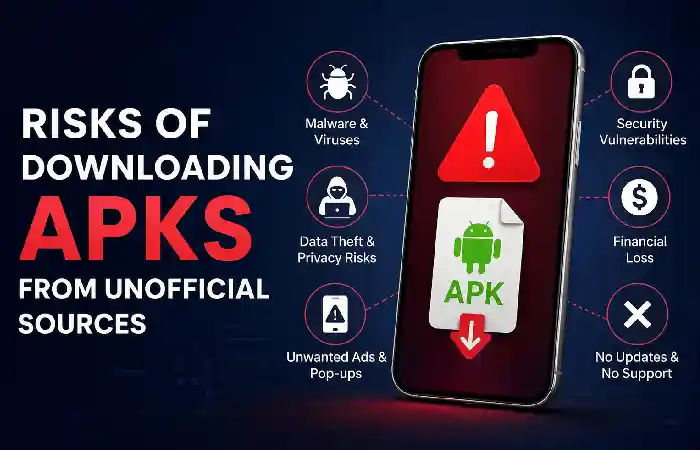
Downloading software from unreliable websites involves many risks for users.
Malware
The first and probably the most serious risk is the presence of malware. The application can have a hidden code that:
- Collects personal data of users;
- Prompts users to ads;
- Installs other malicious applications;
- Tracks the activity of the device.
Because malicious code is hidden, it is very difficult for a user to find out if an APK file was modified or not.
Privacy Concerns
Unofficial applications can ask for many permissions that are not required for their functioning.
These are:
- Access to contact list;
- Camera permission;
- Microphone permission;
- SMS permission;
- Location services.
Inability to Receive Automatic Updates
Applications installed outside app stores won’t have automatic updates provided.
Without the latest updates, your device may become vulnerable to:
- Security vulnerabilities
- Incompatibility issues
- Other performance problems
Software updates are among the major aspects of keeping your device protected.
Phishing Websites
Many fake download websites are attempting to lure visitors.
Such websites will usually feature:
- A huge number of pop-ups
- Misleading download buttons
- Requests to install other applications
- A poor design
- No way to contact owners of the website
Always check if you can trust the website before downloading anything.
Steps to Download the Latest Pikashow APK
Launch a Web Browser on your Smartphone
Launch Google Chrome, Mozilla Firefox, or any other reliable web browser on your Android phone.
↓
Look for the Latest APK File
Locate the APK of the latest version of the Pikashow application from any reliable APK hosting websites.
↓
Inspect the Site for Safety
Make sure that the site is safe, has good ratings, and is using the HTTPS protocol before downloading anything.
↓
Select Latest and Compatible APK File
Select the latest and compatible version for your Android phone.
↓
Note the Information of the APK
Make sure that you note the version number, file size, compatibility, and date of the file.
↓
Hit the Download Button
Download the APK file and make sure that the download process finishes successfully.
↓
Locate Downloaded File
Locate the downloaded APK file from your Downloads folder through your File manager app on your Android phone.
↓
Check APK File for Any Threats
Use good antivirus software and scan the APK file for threats.
↓
Install APK File
If you have verified everything, you can go ahead and install the APK file.
Ways to Be Safer when Installing Applications
Regardless of the way you use them – APK files or official app stores – some cybersecurity precautions can be taken.
Downloading from Reputable Sites Only
When possible, get your applications directly from:
- Official app stores
- Official developer websites
- Official software repositories
Don’t use unknown websites without proper ownership or security info.
Checking Applications’ Permissions
Check what permissions applications need before installing them.
Think about whether each permission is necessary for the work of the application.
If something looks strange, avoid installing the application.
Keep Up-to-Date with Updates
OS updates can contain important security fixes.
Make sure that updates are being downloaded automatically.
Use Mobile Security Software
A mobile security application can help you detect potentially dangerous software.
Even though nothing can guarantee your safety, mobile security tools provide one more protection layer.
Avoid Modified Apps
Sometimes, APKs are promoted as “modified” ones with unlocked features.
Unofficial modified applications might:
- Break the terms of service
- Be accompanied by malicious software
- Affect your privacy
- Be unstable
It’s always better to use official applications instead.
What You Need to Know about App Permissions
Modern Android requires users to confirm certain permissions.
Typical permissions include:
- Access to storage
- Camera
- Microphone
- Access to notifications
- Contacts
- Access to location services
Always allow only required permissions.
Safety Tips Before Installing APK Files
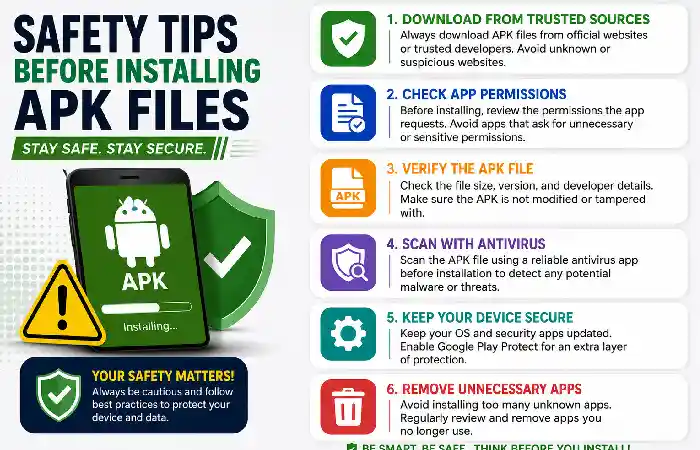
| Safety Tip | Why It Matters |
| Download from Trusted Sources | Reduces the risk of downloading malicious or modified APK files. |
| Verify the APK Version | Ensure you are downloading the latest stable and compatible release. |
| Check App Permissions | Avoid apps that request unnecessary access to your device or personal data. |
| Scan the APK for Malware | Use a reputable mobile security app to detect potential threats before installation. |
| Read User Reviews | Reviews can help identify common issues, bugs, or security concerns. |
| Confirm HTTPS Connection | Download only from websites that use HTTPS for a more secure connection. |
| Keep Android Updated | Security updates help protect your device from known vulnerabilities. |
| Enable Unknown Sources Temporarily | Turn on the setting only during installation and turn it off afterward. |
| Back Up Important Data | A backup helps protect your files if something goes wrong during installation. |
| Avoid Modified or Cracked APKs | These versions are more likely to contain malware or unwanted changes. |
Tips for Protecting Your Android Device
Correct digital hygiene greatly reduces possible threats.
Some helpful tips include:
- Lock the screen of your device or use biometric authentication.
- Use device encryption if such a feature is provided.
- Make periodic backups of the data.
- Do not click on suspicious links.
- Install updates on time.
- Check the list of apps periodically and remove those which are not used.
Legal and Copyright Issues
In case of streaming and downloading content, the user must adhere to all copyright laws and terms of use stated by the content provider.
If the app gives access to movies, series, and other events, make sure that this is an official provider of the content.
Using official apps, we contribute to the development of good-quality entertainment.
Safe Ways to Enjoy Your Free Time
There are plenty of legal sites that stream copyrighted content in various genres.
The pros of official platforms include:
- Good quality of streaming
- Frequent security patches
- Customer support
- Greater privacy
- High-quality audio and video
- Multifunctionality
Common Signs of a Reliable App
Before downloading any apps, consider the following questions:
- Is it an official channel?
- Does it have any information about the developer?
- Is there a privacy policy?
- Does it receive updates frequently?
- Does it ask for excessive permissions?
These questions can help you understand whether the application is safe or not.
Best Practices For Android Users
In order to provide a secure Android environment:
- Make sure to update your operating system.
- Do not install unnecessary applications.
- Do not download applications from unverified sites.
- Back up the most important information.
- Use security features like a screen lock and a device locator.
- Periodically check the permissions of apps.
Implementation of these practices will greatly reduce potential security risks.
Conclusion
Searching terms such as “pikashow apk – download” shows the wish to download applications for Android OS that were not obtained from an official app store. Although APK files are a completely normal thing for Android, using them from unofficial and untrusted resources may cause various issues, including security and privacy issues. It is vital to keep your APK installation safe and use only officially certified services.